| 1. | Content editing |
| 2. | Courses |
| 3. | Exams |
| 4. | Commands |
| 5. | Permissions |
| 6. | Inserts |
| 7. | Variables |
6. Inserts
Text inserts
An entire text can be inserted as a part of another page. This is useful to accomplish one or both of the following effects:
- Announcements. One common and unique announcement can be inserted into several different pages. For example, you want to announce to all students in several of your classes that some event will occur, or that a class is re-scheduled. Then you make one page with announcement. Then you insert the announcement to the web pages of several courses. Visitors to each of these major course pages will see the announcement. If a change is done to the announcement, the change will immediately be visible on every page that has this announcement as an inserted text.
- Keeping parts of the pages private. Imagine that you want to share the link to an online meeting with your students. However, you do not want to share the link with every visitor. Then you create the page with the link. The page with the link has permission set in such a way that only your students can see it. When this page with the link and the appropriate permission is inserted in other documents, the page will be invisible to the non-registered website visitors. The page will be visible only to students.
Implementation of text inserts
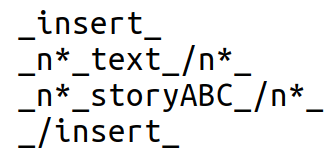
The first step is to create a text that will be inserted into other pages. This text is created in the same way as any other text. If you give it the name storyABC, then you can insert it in another text by typing
Other inserts
In addition to texts, there are other components that can be inserted into a page. We will list some of them:
internalLink. This is an alternative to direct insertion using html tags. You will only need to provide the name of the page and skip writing the entire URL.buttonLink. The link will be displayed inside a button. You will need to put the entire URL.-
courseAssignment. This will provide the grade table. The instructors will see the grades of all students and the control panel for the grade center. The students will see only their own grades. -
invitationToSolve. This component will put the correct link for an assignment (homework or exam). The assignments are elements of the databaseResponse Receivers. Students will have their own response receivers for each of the assignments. The instructor controls the status of all of them through the grading center. If the assignment is open for solving, the response receiver will display the correct form that shows the questions. If the exam is already graded and the grades are available, then the students will see the exam with their grades. -
message. This component allows you to insert forums or messages directly to any pages of the website. This allows you to customize forums instead of having them look the same. externalURL. The content of the external url will be read and embedded into the website. There are two parameters (in addition to the parameterexternalURL). The first is the url address. The second parameter can be empty or it can contain the name of the text that has possible token required by the external resource. If the external resource is GY version 2.8 or higher, then the parameters&tu=awould remove the header.
Examples of inserts can be best seen by accessing various pages and clicking on edit button. This would expose you to the source files that contain proper syntax for all of the insert commands.